Explore the cutting-edge tech transforming the restaurant industry. From self-service innovations to POS integrations and AI-powered ordering, learn how technology is reshaping customer experiences and operational efficiency.
Somewhere this month, in a conference room or a Zoom window, 2027 budget discussions will commence, and the first thought is to look at 2026’s budget as a starting point. But there are other places to look.
The numbers that will decide what your 2027 technology budget can actually do are already published. Some of them were certified by a state agency in July. Others sit in a USDA table that updates on the 25th of every month. None of them require a forecast, a consultant, or a crystal ball. And once you account for them, the discretionary portion of that budget turns out to be a lot smaller than the line item everyone is staring at.
Start with the ceiling, not the wish list
Restaurant IT budgets now average 2.58 percent of revenue, according to Hospitality Technology’s 2026 Restaurant Technology Study. That figure gets quoted a lot, usually as evidence that the industry is finally taking technology seriously.
The more useful number is buried right next to it. Sixty-six percent of that spend goes to maintaining solutions that already exist.
Run the math. On a twenty-unit portfolio doing $2.5 million per store, 2.58 percent of revenue is about $1.29 million in annual technology budget. Two-thirds of that is committed before the planning meeting starts. What’s actually available for anything new is closer to $440,000, or roughly nine-tenths of one percent of revenue.
That’s the real number. Every vendor conversation you have between now and December is competing for a slice of nine-tenths of a percent.
Three numbers you can write down today
The cost pressures shaping next year’s P&L aren’t a mystery, and they aren’t evenly distributed. Three of them are specific enough to put in a model right now.
Food. The USDA’s Economic Research Service projects food-away-from-home prices rising 2.7 percent in 2027, with all food up 2.4 percent. The pressure underneath that average is concentrated: beef and veal are running up 9.8 percent this year, and wholesale beef 9.4 percent. If protein is a meaningful share of your menu mix, your 2027 food cost line moves well ahead of the headline number.
Labor. California’s minimum wage rises to $17.40 on January 1, 2027, after the Department of Finance certified a 2.99 percent CPI adjustment in July. The state’s fast food minimum holds at $20. Most other indexed states will publish their January adjustments over the next several weeks, and if you operate across state lines, those dates are worth a calendar entry rather than a surprise.
Wage drift everywhere else. Private-industry wages rose 3.1 percent for the twelve months ending June 2026, per the Bureau of Labor Statistics Employment Cost Index. That’s the number that moves your shift leads and general managers, the roles no minimum wage schedule touches.
None of these are things to hedge against. They’re line items. You can put them in a spreadsheet this afternoon.
The margin you’re budgeting against
Here is the context that makes the budget conversation hard. The National Restaurant Association’s 2026 State of the Restaurant Industry found that 42 percent of operators reported their restaurant was not profitable last year. Industry sales are projected at $1.55 trillion with 1.3 percent real growth.
Growth of 1.3 percent does not absorb food costs, up 2.7 percent, and wages up 3.1 percent. The gap has to come from somewhere, and for most portfolios it comes from throughput, check average, or waste.
Which means the technology budget stops being defended on roadmap and starts being defended on return. Nobody is approving a platform because it’s modern.
What most portfolios haven’t priced
There’s one more thing sitting in the 2027 budget that a lot of operators haven’t fully accounted for. Forty-four percent of operators plan to replace or significantly upgrade their POS, according to Hospitality Technology’s 2026 POS Software Trends Study.
For a lot of multi-unit operators, both of those decisions land in the same budget year, pulling from the same small pot. And they’re tangled together. The reason two-thirds of the budget goes to upkeep is that most operators bought their systems one at a time and figured out how to connect them later.
So the order you do things in matters more than what you buy. Before you commit to anything customers touch, you need to know where the POS is headed. If the plan is to sort out the connections afterward, that’s how the upkeep line gets to two-thirds in the first place.
What clears approval
The requests that get funded and the requests that get deferred tend to differ in one specific way. The funded ones show a payback the finance team can verify inside the fiscal year, using the operator’s own transaction data rather than a vendor’s blended average.
For self-order kiosks, two lines carry that argument, and both are auditable against a POS export. The first is check average on kiosk orders versus employee-taken orders in the same store and same daypart. The second is order accuracy, which shows up as comps and refunds and is usually undercounted because nobody assigns it a dollar figure.
Build from the floor up
The instinct in September is to open last year’s budget and work down from it. The better exercise is to build from the cost floor up: write down the three inputs you already know, subtract the maintenance commitment, and see what’s genuinely left.
Then ask the only question that survives that exercise. Of everything on the list, which single investment pays back before the fiscal year closes?
Most multi-unit operators evaluate kiosk hardware on upfront cost and feature set. What happens in year four when the payment device falls out of compliance? Or what about year six when the printer manufacturer sunsets the model running across 60 locations? It’s a point that rarely makes it into that conversation.
The kiosk ages. The technology inside it moves faster than the case that houses it. And by the time a component reaches end of life (EOL), the options available to an operator are far more limited than they would have been with a year’s notice. Operators who think about this early have choices. Operators who think about it after something breaks mostly don’t.
A Kiosk Is a Long-Term Operational Asset
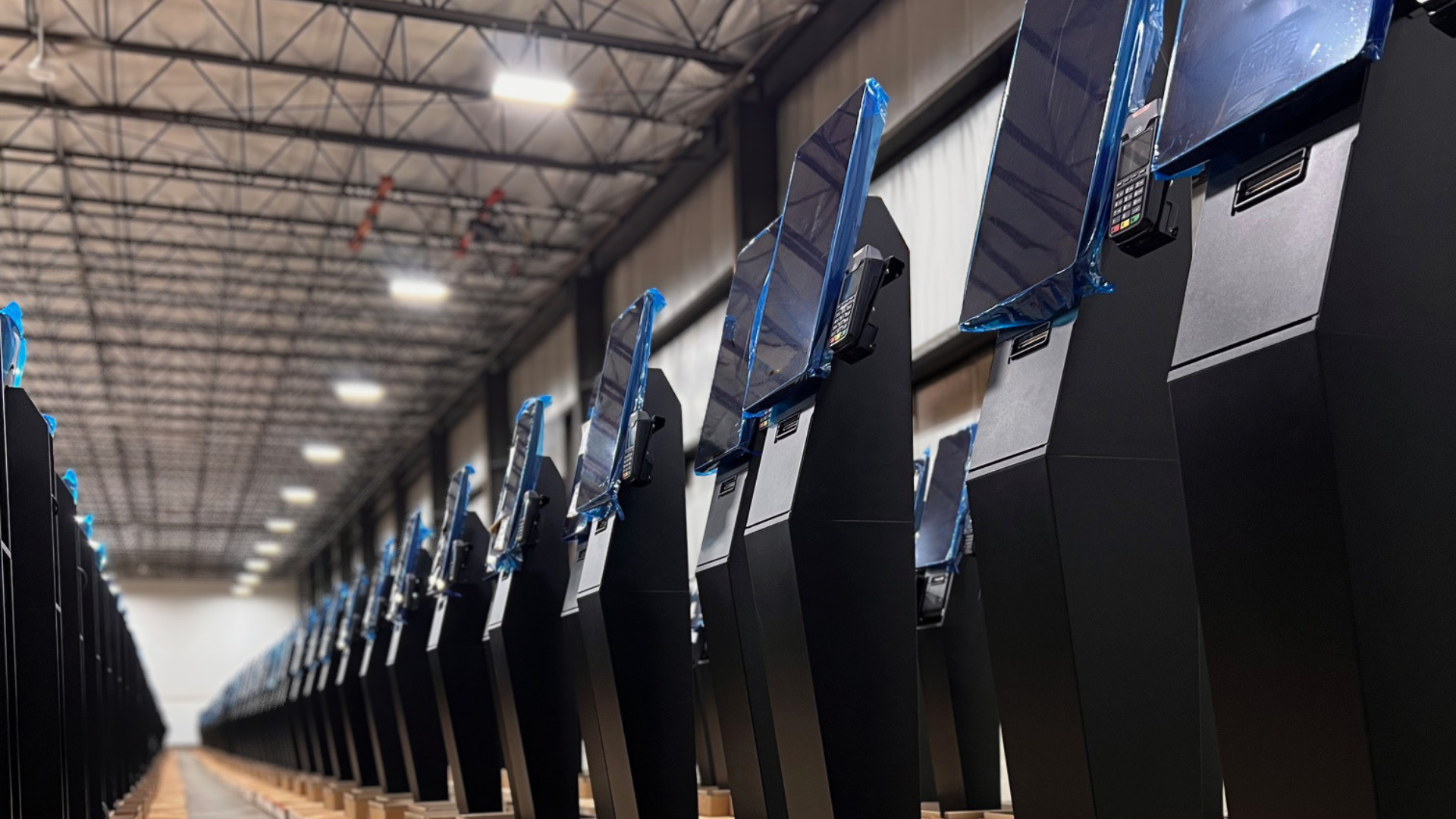
A kiosk that goes live today will likely still be physically standing in seven to ten years. The case itself is the most durable part of the system. What changes—on its own timeline, independent of anything the operator controls—is everything inside it.
Jared Epstein, Account Executive at Frank Mayer and Associates, puts it directly: “A kiosk is not just a one-time hardware purchase, rather a long-term operational asset that needs to support years of software updates, payment changes, peripheral refreshes, service requirements, and evolving customer expectations.”
That changes how operators should think about what a kiosk actually costs. The purchase price is the entry point. The real question is what it takes to keep the system running well over the full life of the deployment, and whether the hardware was designed with that in mind.
What End of Life Actually Means Across an Organization’s Fleet
EOL is a layered set of timelines that rarely sync up, and each layer carries its own risk.
Payment devices are the most visible example. EMV compliance, NFC certification, contactless payment standards—these cycles are driven by card brand mandates and security requirements, not by the operator’s schedule. A payment device that was fully certified at deployment can fall out of compliance before the rest of the kiosk shows any signs of wear.
Epstein identifies the full range of components in play: “Payment devices, for example, can move through EOL cycles every few years due to compliance, security, or certification requirements. Printers, scanners, ADA keypads, cameras, and other peripherals can also change over time.”
Each one has its own manufacturer roadmap, its own parts availability window, and its own potential to force a reactive decision if it isn’t tracked ahead of time.
Cybersecurity adds another layer. Older operating systems eventually lose vendor support, which means security patches stop coming. For operators running kiosks that handle payment data or customer information, that’s a compliance exposure that compounds quietly over time.
Modular Design Is the Difference Between a Swap and a Full Replacement
How a kiosk is built determines how much an operator can handle without replacing entire units. The design decisions made before a deployment have direct consequences years later.
The goal is simple: components that are likely to need replacing before the case does should be installed in a way that lets them be swapped out independently. Epstein describes how Frank Mayer approaches this: “Wherever possible, critical components should be mounted with removable or modular brackets so they can be replaced, upgraded, or retrofitted without requiring an operator to replace the entire kiosk fleet.”
In practice, that means payment devices, printers, scanners, and other peripherals are installed with serviceability in mind, so that replacing one part doesn’t turn into a whole-unit problem. Frank Mayer’s brackets are engineered to accommodate future changes and can typically handle new devices unless the new device is a dramatically different size or shape.
That limit is worth keeping in mind. Modular design reduces exposure, and it works best alongside proactive planning—not as a substitute for it.
Lifecycle Planning Starts at Deployment
The most expensive EOL situations are the ones that come as a surprise. When a component is already discontinued, the options narrow fast: hunt for remaining stock, pay a premium for aftermarket parts, or replace units ahead of schedule. None of those are easy outcomes when they hit across a large fleet at once.
Epstein is direct about when this thinking needs to start: “From the start of a deployment, it is important to identify the products that could potentially go EOL and understand where these products are at in their lifecycle—this helps avoid surprises.”
In practice, that means asking specific questions during vendor selection. What is the manufacturer’s support history on this component? What does their product roadmap look like? What happens to parts availability when this model is discontinued? Are there known successors, and will they fit the current mounting setup?
These are straightforward questions. They just rarely get asked early enough.
“The biggest mistake operators, or kiosk manufacturers, can make is treating EOL planning as something to deal with later,” Epstein says. “By the time a component is discontinued or unsupported, the operator may be forced into a rushed and expensive decision. Designing for that change from day one alleviates that, and selecting reliable components, understanding their lifecycle, and engineering for serviceability will really help save the operator and the kiosk at the end of the day.”
The Software Layer Has to Keep Up
Swappable hardware only solves part of the problem. A component change that triggers a months-long software integration project—or disrupts the guest experience in the process—wipes out most of the value that good hardware design was supposed to deliver.
This is where the kiosk software provider matters just as much as the hardware vendor. Operators should ask the same hard questions of both.
Lea Anne Roberts, SVP of Customer Experience here at Bite, frames it around what’s ultimately at stake: “At the end of the day, a kiosk is a hospitality touchpoint. When hardware starts to degrade—slow screens, unresponsive payment devices, peripherals that fail mid-transaction—it doesn’t just create an operational headache. It breaks the guest experience at exactly the moment you’re asking them to trust the technology. Lifecycle planning is really about protecting that experience for the long haul. The software has to be built to absorb hardware changes without the guest ever feeling the disruption.”
Whether the software works with today’s hardware matters less than whether it’s built to flex when that hardware changes without forcing the operator to replatform, reprice, or retrain staff every time a peripheral cycles out. Bite’s kiosk software is built with that flexibility as a design principle, not a retrofit.
A Framework for Assessing Lifecycle Risk
Before the next deployment decision—or when auditing an existing fleet—these are the questions worth getting clear answers on.
What is the EOL timeline for each major component currently deployed: payment devices, printers, scanners, display hardware, and the underlying OS? Does the hardware vendor offer modular replacement options, and what are the realistic limits when a new device looks significantly different from the old one? What is the manufacturer’s track record on parts availability after a product is discontinued? Is the software platform built to handle peripheral changes without a broader integration project? And is there a multi-year budget that accounts for component refresh—not just the initial purchase?
Operators who work through these questions before signing have options. Operators who surface them after something breaks have far fewer.
Planning for Year Seven Starts on Day One
Kiosk deployments are long-term commitments. The operators getting the most out of them—in throughput, check lift, and guest experience—treat them that way from the start.
Think about serviceability when selecting hardware. Track component timelines before they become urgent. Make sure the software is built to absorb change. The kiosks that perform well in year seven are the ones that were planned for year seven from the beginning.
When operators evaluate AI upselling at the kiosk, a reasonable concern tends to surface early in the conversation: if the kiosk is prompting guests to add a side, upgrade a combo, or try a new LTO, doesn’t that add time to the order? And if it adds time to every order, doesn’t that create a throughput problem?
It’s a fair question. One the data answers clearly.
AI upselling at the kiosk doesn’t compete with speed. When configured correctly, it operates in parallel with it. Understanding why requires a look at where throughput actually improves in a kiosk-enabled environment—and what changes when order intake moves from the counter to a self-service channel.
Where Kiosks Create Speed
The throughput gains from kiosk ordering don’t come from eliminating the upsell. They come from shifting where order intake happens—and what that shift makes possible for the staff on the other side of the counter.
When a kiosk handles taking orders, front-of-house staff are freed from managing verbal ones, clarifying customizations, and processing payment simultaneously under pressure during peak hours. That cognitive load doesn’t disappear, it gets redistributed to a channel that handles it more efficiently, while staff redirects their energy toward fulfillment, food quality, and the guest experience at the handoff point.
The result is a more focused operation on both sides. Guests browse and order at their own pace without feeling rushed. Staff focus on what they do best. And the kitchen receives cleaner, more accurate orders that route directly from the kiosk without a verbal handoff that introduces errors.
QSR Magazine’s analysis of next-generation restaurant formats found that three out of four kiosk-enabled locations outperformed their legacy counter-service counterparts on overall order accuracy scores—and that technology-enabled ordering drove speed improvements for digital orders placed for pickup. Accuracy and speed improved together, not at each other’s expense.
Recent research underscores how sensitive the throughput economics actually are: reducing a customer’s wait time by just seven seconds can produce a 1% increase in sales. Every improvement in order flow efficiency has a direct, measurable revenue consequence. Which is why the operational shift that kiosks enable matters well beyond the technology itself.
Why Order Accuracy Is a Throughput Metric
One of the clearest throughput benefits of kiosk ordering is one that often gets framed as a guest satisfaction story: order accuracy.
According to Qu’s 2025 State of Digital Restaurant Report, nearly 70% of enterprise restaurant brands cite order accuracy as their single biggest efficiency challenge. A 2025 QSR Drive-Thru Report adds important context: 62% of incorrect orders trace back to customization errors—precisely the kind of miscommunication that self-service ordering eliminates structurally, because guests input their own specifications rather than relaying them verbally.
Every incorrect order is a throughput event. A re-fire consumes kitchen capacity. A refund or comp requires staff intervention. A remade order adds time to fulfillment for the guest who ordered correctly behind it. Accuracy improvements at the order-intake stage don’t just improve guest satisfaction, they reduce the operational drag that slows the entire fulfillment chain.
In fact, order accuracy is demonstrably higher when guests place their own orders—a finding that reflects the straightforward logic of removing the verbal handoff from the equation entirely.
The Upsell Prompt and the Order Flow: What the Data Shows
The concern that upsell prompts add meaningful time to a transaction assumes that the prompts are interruptive, multi-step, or poorly designed. That assumption holds for a badly configured upsell flow. It doesn’t hold for well-built AI upsell logic.
A well-configured prompt is a single, contextually relevant suggestion that appears at the natural moment in the ordering flow—after the primary item is selected, before payment. It takes a guest a second or two to accept or dismiss. It is not a negotiation. It requires no staff involvement. And because it’s integrated into the ordering sequence rather than appended to it, it doesn’t extend the transaction in any meaningful way.
The more important comparison is not between a kiosk upsell and no upsell. It’s between a kiosk upsell and a human upsell at the counter. An Intouch Insight study found that digital channels executed upsell prompts 71% of the time, compared to 58–60% for human staff at the counter and drive-thru.
The reason? Human upselling is inconsistent by nature. Staff execute it differently depending on the shift, the volume, and their individual training and confidence level.
The kiosk upsell doesn’t vary. It executes on every transaction without adding the interpersonal friction that can make counter-based upselling feel uncomfortable for both staff and guests.
Check Average Lift: The Revenue Side of the Throughput Story
The speed and accuracy benefits of kiosk ordering are well-established. Higher check averages are equally compelling, and the two outcomes reinforce each other rather than trade off.
According to PAR Technology’s 2025 QSR Operational Index, kiosk check averages have grown faster than counter checks since 2021, outpacing counter check growth by a meaningful margin. The report attributes this directly to the consistent upsell execution that digital ordering enables—a finding that echoes across the industry.
Restaurant Dive’s reporting on Shake Shack’s kiosk performance captures the dynamic clearly: the company’s kiosk channel now accounts for over half of its in-restaurant sales. CFO Katie Fogertey has credited deliberate investment in upsell configuration, offering contextual prompts for additions like an extra patty or bacon, as a key driver of kiosk checkout performance versus the counter. Shake Shack’s results were not a byproduct of the technology alone. They were the result of thoughtful configuration of that technology.
For brands that partner with Bite for their kiosk operations, the pattern is consistent. Crazy Bowls & Wraps, a fast casual chain that implemented kiosks using Bite Lift, reported a 38% increase in average order value—a result that reflects what well-configured AI upsell logic delivers when it’s built around the items and moments that actually move the needle on margin.
“Our partnership with Bite has been awesome. Our check averages for orders placed on the kiosks increased by 38%. We’ve also been able to reallocate our labor to better enhance the guest experience, resulting in a substantial improvement in our order accuracy.” — Kim Reitzner, Former COO of IT, Crazy Bowls & Wraps
The mechanism behind the lift is straightforward. Guests browsing at a kiosk encounter high-margin items with visual merchandising, clear pricing, and a low-friction path to adding them. They make that decision without the social pressure of a line behind them or the time pressure of a staff member waiting for a response. QSR Magazine notes that order accuracy and check size both improve when guests place their own orders and that kiosk orders consistently carry a higher margin than counter orders because the experience is designed to surface higher-margin items alongside the primary order.
Configuring for Both Speed and Revenue
The operators who see the strongest combined throughput and check average results from kiosk upselling share a few common configuration principles.
Daypart awareness. Effective AI upsell logic reflects the purchasing behavior of the daypart. A breakfast prompt looks different from a dinner prompt in the items suggested, the visual presentation, and the price point. Generic upsell logic that doesn’t account for daypart performs below its potential on both conversion and relevance.
Prompt depth discipline. A single, well-placed suggestion outperforms three sequential prompts on every meaningful metric: conversion rate, perceived order speed, and guest experience. The goal is one frictionless moment of discovery per transaction, not a series of interruptions that make guests feel like they’re navigating an obstacle course.
Visual merchandising quality. High-quality imagery, clear pricing, and a single-tap acceptance path reduce both hesitation time and decision friction. When the visual presentation does the work, guests make faster decisions, which benefits both throughput and attachment rate simultaneously.
The Portfolio-Level Case for Consistent Execution
For a multi-unit franchise operator, the throughput and revenue arguments converge on a single outcome: consistency across locations.
A kiosk executes the same upsell logic on every transaction, at every location, across every shift. It doesn’t have an off day. It doesn’t skip the prompt when the lunch rush is heavy. It doesn’t execute differently at location 6 than it does at location 22. The performance that a well-configured kiosk delivers at your best location is the same performance it delivers at every location in the portfolio.
That consistency compounds significantly at scale. Across daily transaction volume, across 20 or 30 locations, across a full operating year, the revenue difference between consistent AI upsell execution and variable human-dependent upselling is substantial. Even when the per-transaction lift is modest.
The throughput gains compound the same way. Fewer order errors means fewer re-fires system-wide. Cleaner order intake means more efficient kitchen routing across the portfolio. Staff freed from order-taking means a more focused fulfillment operation at every unit, every shift. For operators who want to understand what that looks like in practice, request a demo to walk through your specific operation.
For most QSR and fast casual franchise systems, the decision to implement kiosks is made well above the operator level. Corporate selects the hardware, negotiates the vendor agreement, architects the menu, and communicates the brand standard. The franchisee’s job is to deploy and execute.
So when kiosk performance varies significantly across a portfolio—when location 6 is driving strong check average lift and location 19 is falling short—the instinct is to look at the technology. Same vendor. Same software. Same corporate configuration.
More often than not, the technology isn’t the issue—the execution is.
For multi-unit franchise operators managing 10, 20, or 30-plus locations, execution variance is one of the most underexamined sources of revenue gap in a portfolio. It doesn’t show up as a catastrophic failure. It shows up as check averages that never quite reach their potential, upsell attachment rates that are inconsistent across units, and kiosk adoption numbers that tell very different stories depending on which location you’re looking at.
According to QSR Magazine, nearly 70% of enterprise restaurant brands cite order accuracy as their biggest efficiency challenge—a number that has grown year over year as kiosk deployments have scaled. The brands gaining ground are the ones treating efficient kiosk execution as a strategic priority rather than a day-one deliverable.
Corporate Designs the Experience. The Franchisee Owns the Outcome.
This is the central tension in franchise kiosk deployments, and it’s worth stating plainly.
When corporate works with a kiosk software vendor to engineer the upsell logic, the promotional sequencing, and the menu architecture, they’re building toward a revenue and margin model that assumes consistent execution across the system, where every location is running the same configuration, driving the same attachment rates, and delivering the same check average lift. At least in theory.
That assumption is almost never fully realized in practice. And the franchisee absorbs the gap.
The reasons cluster around three operational realities that don’t get enough attention in conversations about kiosk technology:
Physical placement
Menu and configuration accuracy
Kiosk health
Each one is invisible in aggregate reporting. Each one compounds quietly across a portfolio. And none of them get resolved without the right combination of operational discipline and technology infrastructure.
The Physical Execution Problem
The most overlooked variable in kiosk performance is also the most visible: where the kiosk is, and whether guests know to use it.
A kiosk placed near the entrance, at natural eye level, with clear signage directing guests toward self-order, will drive materially different adoption than a kiosk positioned in a corner of the dining room with no wayfinding. Both units may have identical software configurations. One location’s kiosk is generating transactions throughout the lunch rush. The other is being largely ignored by guests who defaulted to the counter because nothing pointed them elsewhere.
This isn’t a hypothetical. Placement and adoption signage are among the most common differentiators between high-performing and low-performing kiosk locations in a franchise system. A location where staff actively direct guests to the kiosk, where floor signage is current and well-positioned, and where the kiosk is physically integrated into the natural flow of the space will consistently outperform one where the kiosk exists as an afterthought in the layout.
This shows up in adoption rates. And adoption is the prerequisite for everything else the kiosk is supposed to do—the upsell logic, the check average lift, the labor reallocation. None of it matters if guests aren’t using the kiosk in the first place.
Menu & Configuration Accuracy Problem
Even when corporate has worked to ensure upsell logic is done correctly, what’s running at any given unit can diverge from that standard over time.
A menu update rolls out but doesn’t propagate cleanly to every location. An LTO launches and two units in the portfolio are still running the previous promotional sequence. A price adjustment is made at the POS level, but isn’t reflected on the kiosk interface. None of these are dramatic failures, but each one represents a measurable gap between what corporate intended and what the guest actually experiences.
As industry reporting on QSR menu management notes, in multi-unit operations with frequent promotions and regional pricing, manual update processes introduce delays, errors, and configuration drift that compound across locations over time. A single missed update at a handful of units—incorrect pricing during a promotional period, an LTO that launched late—creates brand inconsistency, franchise disputes, and direct margin loss.
The Kiosk Health Problem
There’s a failure mode that’s even more basic than configuration drift—and often just as invisible: the kiosk that’s down, frozen, or underperforming, and nobody knows about it.
QSR Magazine’s coverage of hidden technology costs puts the stakes plainly: when restaurant technology fails, the cost isn’t just in lost transactions, it’s in labor workarounds, damaged guest experience, and brand perception that erodes transaction by transaction. A kiosk that goes offline during the lunch rush, or that appears operational but is frozen on a loading screen, is generating zero revenue while appearing on paper as an active asset.
The problem isn’t always dramatic. A kiosk can be technically powered on but stuck in an incorrect mode. It can be processing orders at a fraction of its typical volume because a connectivity issue is slowing the interface. It can have been quietly switched off by a staff member who found it easier to redirect guests to the counter. In any of these scenarios, the location is underperforming, and without real-time monitoring, no one at the operator or corporate level knows until they look at the end-of-month numbers and see the gap.
For a multi-unit franchisee, the lag between a kiosk going down and someone noticing is a direct revenue leak. Multiply it across a fleet of locations over the course of a year, and the cumulative impact is substantial.
Closing the Gap: What the Right Infrastructure Makes Possible
These three problems—physical placement variance, menu and configuration accuracy, and kiosk health gaps—share a common characteristic: they’re all invisible without the right reporting and monitoring infrastructure in place.
Closing them requires two things to work in parallel: proactive uptime monitoring at the kiosk level, and portfolio-level performance visibility that helps operators and corporate teams see what’s actually happening across the system.
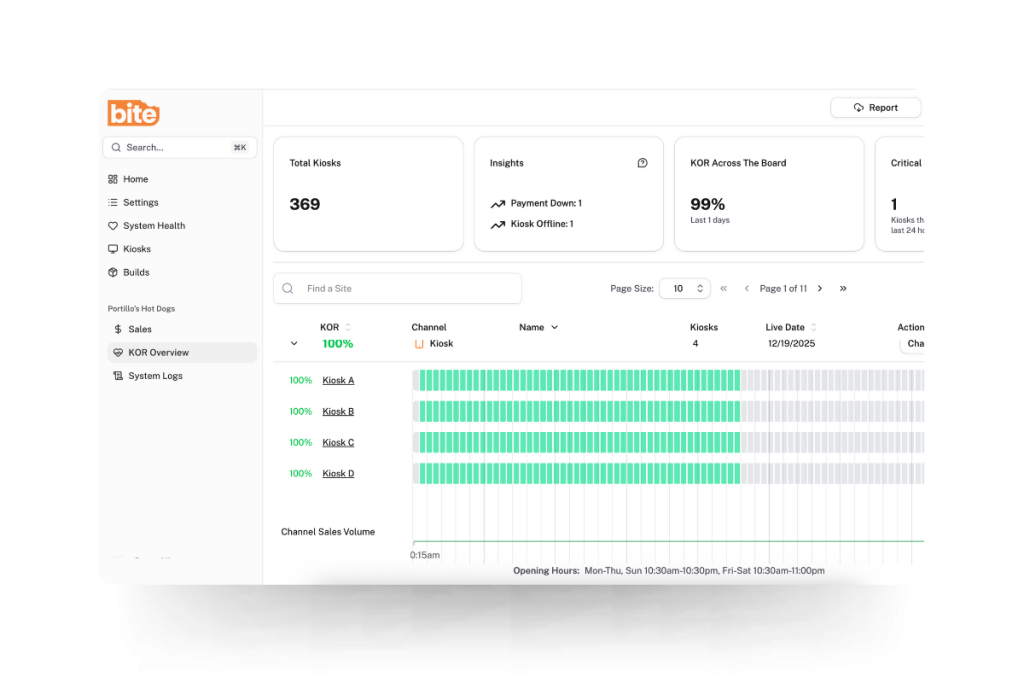
Real-time kiosk monitoring: Bite’s KOR (Kiosk Order Ready) Dashboard
KOR is Bite’s real-time kiosk monitoring system, designed to surface kiosk health issues before they compound into meaningful revenue loss. KOR continuously monitors each kiosk in a fleet for connectivity, operational status, and order flow. When a kiosk goes offline, experiences a hardware issue, or stops accepting orders, KOR immediately sends an alert—via SMS or email—to designated contacts, whether that’s the store manager, a regional operator, or a corporate IT team.
The operational value is straightforward: rather than discovering a kiosk was down for three hours after the fact, operators can act on issues in real time, minimizing downtime and protecting the revenue the kiosk was deployed to generate.
Uptime monitoring addresses acute issues. Portfolio-level reporting addresses the chronic ones—the performance variance that accumulates quietly across locations over weeks and months.
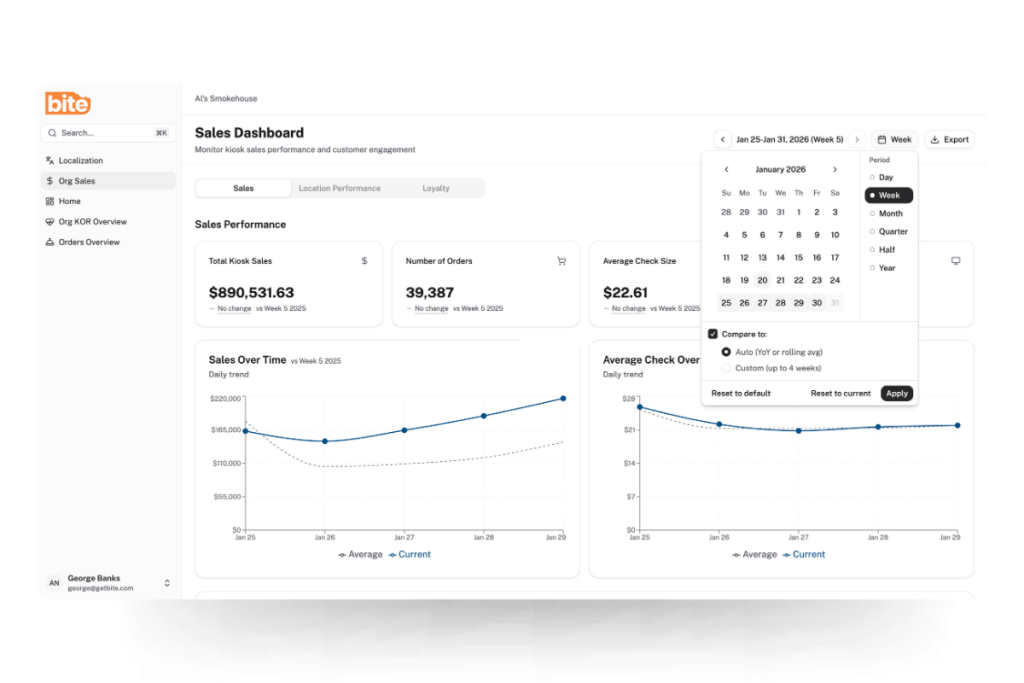
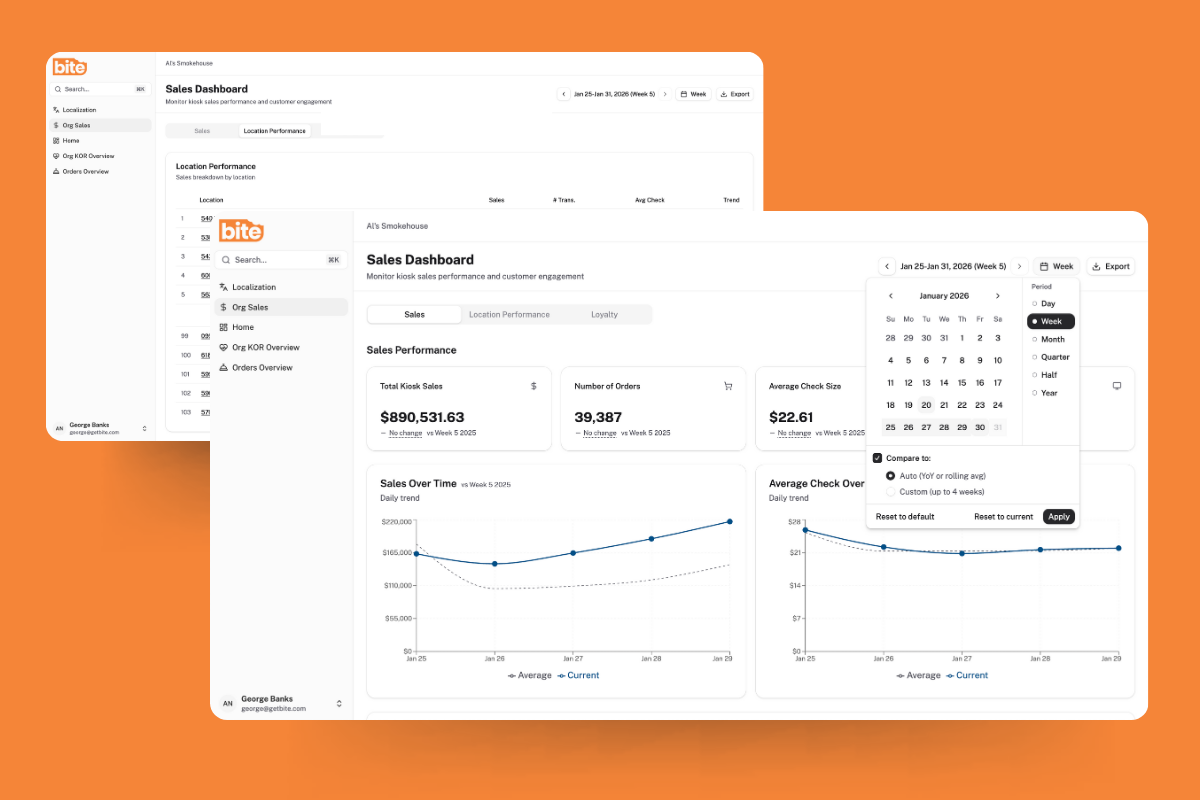
Bite’s Sales & Analytics Dashboard gives both corporate teams and individual franchise operators a clear view of what’s actually happening across kiosk-enabled locations. Corporate sees the full system—total sales, average check sizes, order volume, and location-level performance across the entire footprint. Individual franchisees see the same depth of insight scoped to their own units.
The features that matter most for closing execution gaps:
Location-level comparison. The dashboard makes it straightforward to identify top-performing locations and understand what’s driving their results—and to flag underperforming locations that may need operational attention. A location consistently running below system average on check size or attachment rate is a signal worth investigating. Is it a placement issue? A configuration gap? A staffing behavior driving guests to the counter? The data surfaces the question; the operator can then go find the answer.
Hour-by-hour order trends. Breaking down order volume by hour gives operators the data to optimize staffing and identify peak-period performance gaps. A kiosk that should be driving strong lunch volume but shows a mid-shift drop-off may have experienced an issue KOR already flagged—or it may reflect a staffing or placement dynamic that requires a different kind of intervention.
Promotional and LTO performance tracking. Filtering by date range allows operators to evaluate kiosk performance during specific promotional periods, seasonal peaks, or new menu rollouts—and to compare current performance against any historical period to identify whether configuration changes are having the intended effect.
Loyalty program metrics. For brands leveraging loyalty through their kiosks, the dashboard surfaces loyalty penetration rates, average check uplift from loyalty members, and revenue opportunity forecasting based on increasing loyalty adoption. This gives operators a quantified view of the ROI their loyalty program is generating at the kiosk level.
Together, KOR and the Sales & Analytics Dashboard address both ends of the execution gap problem: the acute issues that need immediate response, and the chronic variance that requires systematic visibility to diagnose and close.
What the Data Makes Visible
Consider what changes for a regional franchisee operating 20 locations when this infrastructure is in place.
Location 14 shows up in the dashboard as consistently below the system average on average check size. KOR has logged two brief outage events in the past month, both resolved within minutes of the alert. But the check average gap persists even when the kiosk is fully operational, which points toward a placement or adoption issue rather than a technical one. The operator visits the unit and finds the kiosk tucked against a side wall with no directional signage, while guests queue at the counter out of habit.
That diagnosis—and the fix—would have been invisible without portfolio-level reporting. The location would have continued to underperform, the revenue gap would have continued to compound, and the cause would have remained unknown until someone happened to notice it on a site visit.
This is what the right technology infrastructure makes possible. Not just kiosks that take orders, but visibility that allows operators and corporate teams to ensure those kiosks are performing as the system was designed to perform.
The Rollout Is the Beginning, Not the End
For franchise operators in QSR and fast casual, the kiosk is increasingly a baseline expectation—from corporate, from guests, and from the competitive landscape. What differentiates operators going forward isn’t whether they have kiosks. It’s whether those kiosks are performing consistently across every unit in the portfolio.
The gap between a well-executing kiosk deployment and an average one isn’t usually a technology gap. It’s a placement gap, a configuration gap, a health monitoring gap, and a visibility gap. Closing all four is what turns a kiosk rollout from a capital line item into a sustained margin driver.
Bite’s platform is built to support that full lifecycle—from real-time kiosk monitoring to portfolio-level performance visibility. If you’re ready to see what consistent, system-wide kiosk performance looks like in practice, request a demo today.
The math is familiar: food costs are up, labor costs are up, and the consumer on the other side of the counter is increasingly resistant to paying more. For QSR and fast casual operators, the instinct is to raise prices—but that instinct is now running headfirst into a market that has started to push back hard.
According to Placer.ai, lower- and middle-income consumers have been pulling back from QSR and fast casual chains they perceive as expensive, shifting their spend toward value grocers, warehouse clubs, and convenience stores. Research indicates that 44% of lower-income consumers are dining out less than they did the prior year. One QSR analyst describes this moment as fast food having “crossed a psychological threshold”—what was once perceived as an affordable option no longer is for many households.
For a multi-unit franchisee operating 20 or 30 locations, that dynamic creates a specific problem. The margin pressure is real, but so is the risk of accelerating traffic loss by raising prices further. Raising prices to combat inflation risks pushing out more price-sensitive consumers. And in a category where traffic is already soft, that’s a trade-off most operators can’t afford to keep making.
The question, then, is not whether to protect margin. It’s how to do it without asking guests to pay more.
Value Isn’t What It Used to Mean
One thing the operating environment last year made clear is that value is not synonymous with price.
The operators that won in 2025 recognized that value is a calculation of price combined with innovation, not just lower price points. Consumers increasingly focus on value through portion size, experience, or perceived quality, and they’re willing to spend if the overall transaction feels worth it.
That distinction matters for how multi-unit operators think about growing revenue per transaction. The goal isn’t to charge more for the same thing. It’s to increase the perceived value of the order—and the actual ticket—by introducing items and combinations that guests genuinely want, at a moment when they’re ready to say yes.
That’s a fundamentally different problem than pricing strategy. And it requires a different tool.
The Check Average Lever Most Operations Are Leaving on the Table
For most QSR and fast casual operators, check average growth has historically depended on two levers: menu price increases and labor-driven upsell at the counter. The first lever is under pressure. The second is inconsistent at best.
Counter-based upselling is subject to human variables—shift fatigue, training quality, rush-hour volume, and turnover. A well-trained team member on a slow Tuesday afternoon is a different upselling engine than an undertrained new hire during a Friday lunch rush. Multiply that variance across 20 or 30 locations, and the revenue opportunity is vast but largely uncaptured.
The data illustrates the gap clearly. According to QSR Magazine, restaurant customers who interact with self-service kiosks typically purchase 10 to 30% more than those who order from employees. The dynamic is well understood. Guests browse at their own pace, encounter high-margin items presented with visual merchandising, and make additions without the social friction of feeling rushed at a counter. The kiosk doesn’t apply pressure—it creates the conditions for discovery.
What the Numbers Show for Well-Configured Kiosk Upselling
The check average lift from kiosks is well-documented. Industry data consistently points to kiosk orders running meaningfully higher in value than counter orders, with variance depending largely on how well the upsell logic is configured.
A Shake Shack case study is one of the most instructive. Per Restaurant Dive, Shake Shack’s kiosks became its largest and most profitable ordering channel, with kiosk checks running higher by a high-teens percentage than checks in other in-store order channels, according to CFO Katie Fogertey on the company’s Q1 2024 earnings call.
As Restaurant Business Online reported, when guests order via kiosk, checks tend to be higher because orders are more likely to include premium LTOs and add-ons; guests also tend to attach a beverage and then eat in-restaurant, which further improves margin by reducing packaging costs.
Shake Shack’s results were not accidental. Its digital marketing team developed more effective ways to guide guests through the kiosk ordering experience by offering upselling options like adding an extra burger patty or bacon—deliberate configuration choices that translate directly to higher contribution margin per transaction.
For Bite customers, the results reflect a similar dynamic. The Original ChopShop, a fast casual chain that implemented kiosks using Bite Lift, reported a 15% increase in average check size—an outcome that illustrates what thoughtfully configured AI upselling can do at the point of sale.
Why AI Upselling Beats Menu Price Increases as a Margin Strategy
The contribution margin math here is important. A menu price increase lifts revenue per item but risks volume erosion if guests trade down or visit less frequently. An AI-driven upsell that attaches a high contribution margin beverage or side to an existing order captures incremental revenue without changing the price of anything on the menu—and without triggering the value perception problem that price hikes create.
QSR Magazine notes that kiosk orders typically carry a higher margin than counter orders because the kiosk experience is designed to drive not only check average, but also the sales of higher-margin menu items. That’s the key distinction: the lift isn’t just in ticket size, it’s in the composition of what’s being sold.
Consider what that means across a portfolio. If an operator running 25 locations improves upsell attachment rate by a modest margin at each kiosk, the compounding effect across daily transaction volume and operating days is substantial. All without a single menu price increase.
The Consistency Problem at Scale
For a regional franchisee operating across multiple locations, the check average problem is rarely about any one unit. It’s about variance. A kiosk at location 1 that surfaces the right upsell prompt at the right moment generates a materially different revenue outcome than a kiosk at location 14 with outdated merchandising logic and a poorly sequenced add-on flow.
Unlike verbal ordering, where upselling depends on employee training and consistency, kiosk-based upselling is standardized by design. That standardization creates controlled experimentation environments where operators can test menu placement, bundling strategies, and item sequencing in ways that were previously impractical in a counter-service setting.
That’s not just a performance advantage. It’s an operational one. Consistent upsell execution across locations means the revenue opportunity isn’t gated by which crew member is working, which manager prioritized training last month, or how busy the lunch shift happened to be.
For multi-unit operators, that consistency is the point.
What Good Kiosk Upselling Looks Like in Practice
Not all kiosk upselling is created equal. The difference between a well-configured AI upsell flow and a poorly designed one shows up directly in attachment rates and in guest experience.
Effective AI upsell logic at the kiosk shares a few characteristics.
Context. The prompt for a breakfast daypart looks different from a dinner upsell, and the suggested add-on reflects what’s actually worth suggesting for the anchor item in the cart.
Correct Sequencing. A single, well-placed suggestion outperforms three interruptions that feel like pressure.
Visual merchandising. High-quality imagery and clear pricing reduce friction and increase conversion.
Bite Lift is built around exactly this kind of precision. Rather than generic “would you like to add a drink?” logic, Bite Lift surfaces item-specific prompts calibrated to what each guest is already ordering—and it does so consistently, at every kiosk, across every location in the portfolio. The result is upsell performance that compounds across transaction volume in a way that counter-based upselling never reliably could.
The Margin Equation for 2026
The operators who will protect and grow margins in 2026 are not the ones who raise prices until guests stop coming. They’re the ones who find smarter ways to capture revenue per transaction from guests who are already there—guests who, as the research shows, are frequently open to adding something they weren’t planning to order.
In a traffic environment where winning new visits is expensive and uncertain, the incremental transaction is one of the highest-ROI opportunities available. AI upselling at the kiosk is the most reliable way to capture it—at scale, consistently, without touching menu prices. If you’re operating in QSR or fast casual and want to understand what that looks like in practice, request a Bite demo and see how Bite Lift performs across your locations.
The Limited-Time Offers (LTO) landscape has never been more crowded. According to Technomic data, the number of LTO launches at restaurant chains more than doubled in recent years, rising from 17,790 in 2020 to 36,830 in 2024, and 2025 was tracking even higher at the time the article was written. Across QSR and fast casual, operators are running seasonal promotions at a pace the industry has never seen before.
The case for running LTOs is well established. TouchBistro’s 2025 American Diner Trends Report found that 62% of diners say they’re motivated to visit a restaurant that has a limited-time offer—and that holds across every generation. LTOs drive traffic. That part is working.
The problem is how most operators measure whether they worked. If your post-LTO evaluation starts and ends with sales volume, you’re answering the wrong question. Volume tells you if guests ordered it. It doesn’t tell you if the restaurant made money on it.
That distinction matters more than operators typically acknowledge. The margin opportunity inside a well-run LTO program is real and substantial. But it’s only capturable if it’s designed for from the start—not treated as an afterthought once the item is already on the board.
The Margin Mistake Most Operators Don’t Catch Until It’s Too Late
The most common analytical error in LTO pricing isn’t carelessness. It’s using the wrong metric as the primary lens. Most operators price new items by targeting a food cost percentage: hit 28%, hit 30%, and the item passes the test. The problem is that food cost percentage and contribution margin don’t tell the same story.
Consider a straightforward illustrative example. Item A is priced at $13 with a food cost of $3.90 (30%), producing a contribution margin of $9.10. Item B is priced at $9 with a food cost of $2.25 (25%), producing a contribution margin of $6.75. Item B has a better food cost percentage. Item A generates $2.35 more profit per transaction.
If you engineer your spring LTO to hit a 28% food cost target and it lands at $9, you may be walking away from more than $2 per order compared to a better-priced item at $13—and that gap compounds fast across a high-volume LTO window.
This is a documented pattern in menu engineering literature: a dish with a higher margin percentage but low sales can generate less total profit than a lower-percentage dish that sells in volume, and conversely, a higher-priced item with a slightly higher cost percentage can dramatically outperform a cheaper item on pure dollars contributed. Contribution margin, not cost percentage, is the right framework for evaluating LTO profitability.
The Three Hidden Costs That Eat Your LTO Margin
Once you have the right metric, the next step is making sure you’re measuring the right costs. Three in particular tend to be undercounted in post-LTO evaluations.
Operational Complexity
Every new ingredient, SKU, or prep step added for an LTO carries costs that don’t appear on the recipe card: staff training time, slower throughput, higher error rates, and waste from over-ordering. QSR Magazine’s long-running Drive-Thru Performance Study has consistently documented that menu complexity is one of the primary drivers of slower service times, and that even small increases in order complexity can meaningfully affect throughput. In a format where speed is a core part of the value proposition, that’s a real business cost. The best-designed LTOs lean heavily on ingredients already in the kitchen.
Waste From Over-Ordering
Seasonal ingredients purchased in anticipation of LTO volume don’t always move at the forecasted rate. Waste is a direct margin hit that rarely gets factored into the post-LTO review — operators see strong early sales and call the LTO a success, even if the tail end of the window created significant spoilage. Operators who track waste by item during the LTO run get a much cleaner picture of true profitability.
The Merchandising Gap
An LTO that guests don’t know about, or don’t understand, doesn’t sell — regardless of how well it was engineered on paper. Research consistently points to a lack of information, rather than price resistance, as a primary barrier to LTO trial. The cost of under-merchandising shows up as opportunity revenue: transactions that could have included the LTO but defaulted to the familiar order instead.
How to Design an LTO for Profit, Not Just Traffic
The fix isn’t complicated, but it requires a different sequence. Instead of starting with a menu concept and then checking whether it pencils out, start with the margin floor.
Start With The Contribution Margin Target
Before the item is conceived, set a floor. What does this LTO need to contribute per transaction to justify the additional operational overhead? If the floor is a $9.00 contribution margin and your target ingredient cost is $3.50, your minimum price is $12.50. That number anchors the concept development, rather than trailing behind it.
Build Around What You Already Have
The most profitable LTOs use existing ingredients in new configurations, or add a single high-impact ingredient to an established base. This constrains the creative brief somewhat, but it dramatically reduces operational complexity costs.
Price For Perceived Value, Not Cost Convention
Spring ingredients carry inherently high perceived value. Guests don’t know what asparagus or fresh herbs cost at wholesale, but they know those ingredients feel seasonal and premium. Spring LTOs can often support higher price points than operators assume, particularly when the item is positioned around freshness and limited availability. Don’t let a food cost percentage target set a price ceiling that your guests aren’t actually imposing.
Set Evaluation Criteria Before Launch
Define success upfront: a minimum order volume threshold, a CM floor, an acceptable waste percentage, and an upsell attachment target. This transforms the end-of-window decision—keep it, iterate it, retire it—from an emotional call into an analytical one. It also prevents the common trap of keeping a low-margin LTO running too long because it “feels like it’s doing well.”
The Upsell Layer: Where Kiosk Technology Captures the Profit LTOs Promise
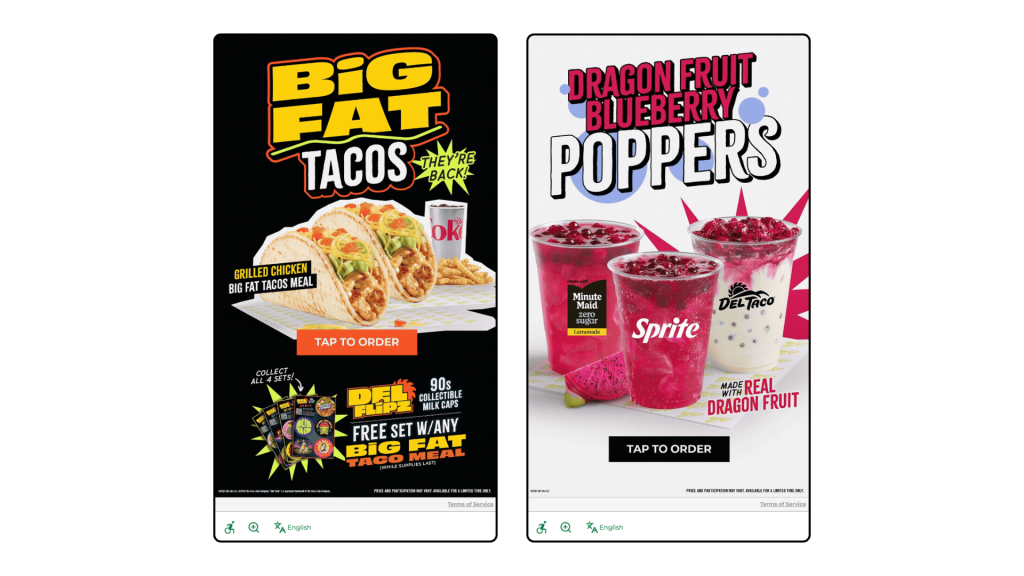
Del Taco kiosk welcome screens, powered by Bite, showcase LTO offerings at the start of the ordering process.
Even a well-designed, well-priced LTO only generates its full margin potential if guests actually order it. In a counter service environment, promotional awareness depends on signage, staff mentions, and timing. At the kiosk, it can be systematic.
AI-driven upsell logic can be configured to surface your spring LTO specifically to guests who haven’t tried it yet, or who have previously ordered similar items. It can prioritize the LTO as a suggested add-on during the window when promotional momentum matters most—typically the first two to three weeks after launch—and deprioritize it as novelty fades. It can also be weighted to push the LTO during slower dayparts, where incremental margin contribution is most valuable.
The kiosk doesn’t replace the LTO strategy. It executes it consistently, at every transaction, without relying on a team member remembering to mention the special or a guest happening to notice a poster on their way to the counter.
Bite Lift is built to do exactly this—surfacing the right item to the right guest at the right moment, so the margin opportunity you built into your LTO doesn’t get left on the table at the point of sale.
The LTO You’re Running Is Probably Worth More Than You Think
The margin opportunity inside most operators’ LTO programs isn’t theoretical. It’s already there. The question is whether it’s being captured through disciplined pricing and margin-first design, or quietly eroded by the wrong success metric, untracked costs, and inconsistent in-restaurant execution.
Running more LTOs won’t close that gap. Running them better will. Request a Bite demo to see how AI upselling supports LTO performance at the kiosk—and start capturing the margin your seasonal program is already generating.
Most operators think of their kiosk as just an ordering tool. But every transaction processed through a kiosk generates structured, queryable data that restaurants can put to good use.
The spring menu planning process at some QSR and fast casual concepts is still largely intuition-driven: chef instinct, trend reports, and a scan of what competitors just launched. Meanwhile, the kiosk is quietly capturing exactly how guests behave when left to browse and choose on their own, without a server influencing the decision.
That behavioral data is one of the most underutilized assets in restaurant operations. And spring menu season is the right moment to start using it.
What Kiosk Data Captures That Counter Service Can’t
Before making the case for data-driven menu planning, it helps to be specific about what’s actually different about kiosk-generated data.
Browse Behavior vs. Purchase Behavior
A kiosk can capture what guests look at before they order: which items they tap into, which they scroll past, and which they linger on before choosing something else. Counter service captures only the final decision. That gap is where you find underperforming items that have an awareness problem versus a genuine preference problem. Those require very different responses.
Modification Patterns
Kiosk orders come with clean, structured customization data. When guests consistently modify a specific item the same way, removing an ingredient or swapping a side, that’s a signal either about guest preference or about how the item is currently built. Both matter for menu planning.
Upsell Acceptance Rates
Which prompted add-ons do guests accept versus decline? This data tells you what pairs naturally with existing items and, by extension, what’s likely to pair well with new seasonal additions.
Note: not all kiosk systems expose all of these data points equally. Before building a planning process around any of these signals, operators should confirm what their platform actually surfaces.
Four Questions to Ask Your Data Before Spring Planning Starts
This is the practical work. Before finalizing any spring additions or retirements, run through these four questions with your kiosk reporting data.
1. Which items are selling well but not contributing to profit?
Map current sales volume against contribution margin, not food cost percentage. High-volume, low-margin items (Plow Horses, in menu engineering terms) are consuming real estate that a better-positioned spring item could occupy. If you’re launching seasonal items without retiring anything, you’re adding menu complexity without improving the economics.
2. Which high-margin items are underperforming on traffic?
These are your Puzzles: items with strong economics that guests aren’t choosing. Before spring, understand why. Is it a placement issue on the kiosk screen? A visual merchandising problem with no photo or a weak description? Or a genuine preference mismatch? The answer determines whether a spring refresh addresses it or the item should be retired.
3. What does your upsell acceptance data say about guest appetite for add-ons?
If guests are consistently accepting beverage upsells with certain entrees but declining dessert prompts, that’s a signal about how to configure upsell logic for seasonal items. A new spring LTO with a natural beverage pairing should have that pairing built into the upsell flow from day one, not added as an afterthought.
4. Are there daypart or day-of-week patterns that a seasonal item could address?
Look for soft spots in your sales mix: lunch lulls, slow Tuesdays, underperforming afternoon windows. A spring LTO positioned specifically for those slots has a more defined job to do and is easier to evaluate post-launch than a general menu addition competing across all dayparts.
Using Data to Test, Not Just Plan
The part most operators skip isn’t the planning—it’s the iteration.
Kiosk data enables a test-and-learn approach to seasonal menus that wasn’t practically possible with counter service alone. The ability to test item placement, adjust upsell prompts, or modify item descriptions in real time, without reprinting physical menus, is one of the most underappreciated operational advantages of kiosk ordering.
A few specific tactics worth building into your spring launch process:
Test Item Placement Before Committing To Promotion
Put a new spring item in two different positions on the kiosk screen for the first two weeks and compare browse and conversion rates before investing in promotional signage.
Use Upsell Prompts As A Discovery Tool
Configuring a new seasonal item as a suggested add-on rather than a featured item gives you early signal on guest receptivity before you commit to making it a menu centerpiece.
Set Evaluation Criteria Before Launch
Define in advance what success looks like for each spring item: a minimum weekly order volume, a contribution margin floor, or a target upsell attachment rate. This makes the decision to keep, iterate, or retire after four to six weeks objective rather than emotional.
What to Do With the Data After Spring Ends
Before retiring spring items, capture the full performance picture: final contribution margin versus projection, upsell attachment rates on each seasonal item, which items appeared most in multi-item orders, and any items that drove measurable traffic lift in targeted dayparts.
This data becomes the starting point for the rest of seasonal planning. Over time, it builds a compounding picture of how your specific guest base responds to new items—something no trend report or competitor analysis can replicate.
The operators who use seasonal transitions as data-collection events, not just revenue events, build menus that get more profitable over time. Not just more creative.
Your Kiosk Already Has the Answers
The spring menu question most operators ask is: What should we add? The more useful question is: What does our data say we should add?
Your kiosk is already generating the research. The browse patterns, the modification data, the upsell acceptance rates—all of it is there. The operators who know how to read it will make better seasonal decisions than those who don’t, and they’ll be better positioned for summer planning by the time spring is over.
A side-by-side analysis of staffing approaches, costs, and guest experience—and when each model makes sense for your restaurant
Picture two nearly identical fast-casual restaurants. Same revenue, same menu complexity, same market. Yet one operates with eight staff members during peak hours, while the other runs smoothly with six. One struggles with 30% labor costs while the other maintains 25%. The difference? Their labor model.
As restaurant operators navigate persistent staffing challenges and laborcosts that now exceed 26% of revenue, the question isn’t just “how do we find workers?” It’s “how do we structure our operations to do more with the team we have?”
The answer increasingly lies in choosing—or blending—the right labor model for your concept. Here’s an honest comparison of traditional and tech-enabled approaches, complete with real costs, guest experience considerations, and when each makes sense.
The Two Models: What They Actually Look Like
Traditional Labor Model
The traditional model is human-powered at every touchpoint. Cashiers take orders, suggest add-ons, and process payments. Staff manually coordinate between front and back of house. Paper tickets or basic POS systems manage the flow.
Typical peak-hour staffing for a location doing $25,000/week:
Front of house: 2-3 cashiers, 1 expediter, 1 host/greeter
Back of house: 3-4 line cooks, 1-2 prep staff, 1 dishwasher
Total: 8-10 staff members
Where it excels: Fine dining, boutique cafes, and concepts where personalized service is the brand differentiator. When guests are paying for an experience, not just a meal, human interaction adds value that technology can’t replicate.
Tech-Enabled Labor Model
The tech-enabled model deploys self-service ordering (kiosks, mobile apps, QR codes), kitchen display systems, and often AI-powered scheduling. Staff shift from transactional roles to hospitality and problem-solving.
Typical peak-hour staffing for the same $25,000/week location:
Front of house: 1 cashier/kiosk ambassador, 1 runner, 1 hospitality lead
Back of house: 3-4 line cooks, 1-2 prep staff, 1 dishwasher (similar to traditional)
Total: 6-8 staff members
Where it excels: High-volume QSR and fast casual, locations with severe labor shortages, markets with $18+/hour wages, and concepts where speed and convenience are competitive advantages.
The Real Cost Comparison
Labor Expenses
Let’s run the numbers for a fast-casual location generating $25,000 in weekly revenue:
Training time: 2-3 weeks to proficiency for each cashier
Order errors: Industry averages show human order-taking produces error rates that technology dramatically reduces
Tech-enabled model:
Initial investment: $2,000-$8,000 per kiosk, plus installation
Maintenance: Ongoing software fees, hardware refresh every 3-5 years
Adoption curve: 4-8 weeks to reach optimal kiosk usage rates
Staff adaptation: Training on new “kiosk ambassador” roles
The ROI typically materializes in 6-12 months—faster for multi-unit rollouts with volume discounts.
Guest Experience: What the Data Shows
Consumer preferences are shifting rapidly. Seventy-two percent of consumers are now comfortable using in-store kiosks, up from 59% the previous year, according to a March 2025 survey by the Kiosk Industry Association. This comfort translates to behavioral change: 62% of kiosk users report discovering new menu items or customizations they weren’t previously aware of, and 76% say kiosks led them to buy more than they intended at least once.
Traditional Model Strengths:
Personal connection and relationship-building with regulars
Real-time menu guidance and answering questions
Accommodating complex dietary needs or special requests
Reading guest cues and adjusting service accordingly
Tech-Enabled Model Strengths:
Self-service kiosks contribute to 99% order accuracy, compared to 91-95% with cashiers
76% of kiosk users buy more than intended at least occasionally
Multiple guests ordering simultaneously during rushes
No pressure to order quickly; browse at your own pace
Reduce total order time by nearly 40%
The trade-off? A 2025 mystery shopping study found that while kiosks excel at speed and accuracy, friendliness scores dropped to 66%—lower than any other ordering method. Technology solves for efficiency; it doesn’t automatically solve for hospitality.
Revenue Impact: The Upselling Advantage
Perhaps the most compelling argument for tech-enabled models is revenue per transaction.
The mechanism is simple: kiosks never forget to suggest add-ons. They don’t get tired, distracted, or uncomfortable upselling. They present recommendations at the optimal moment with visual appeal.
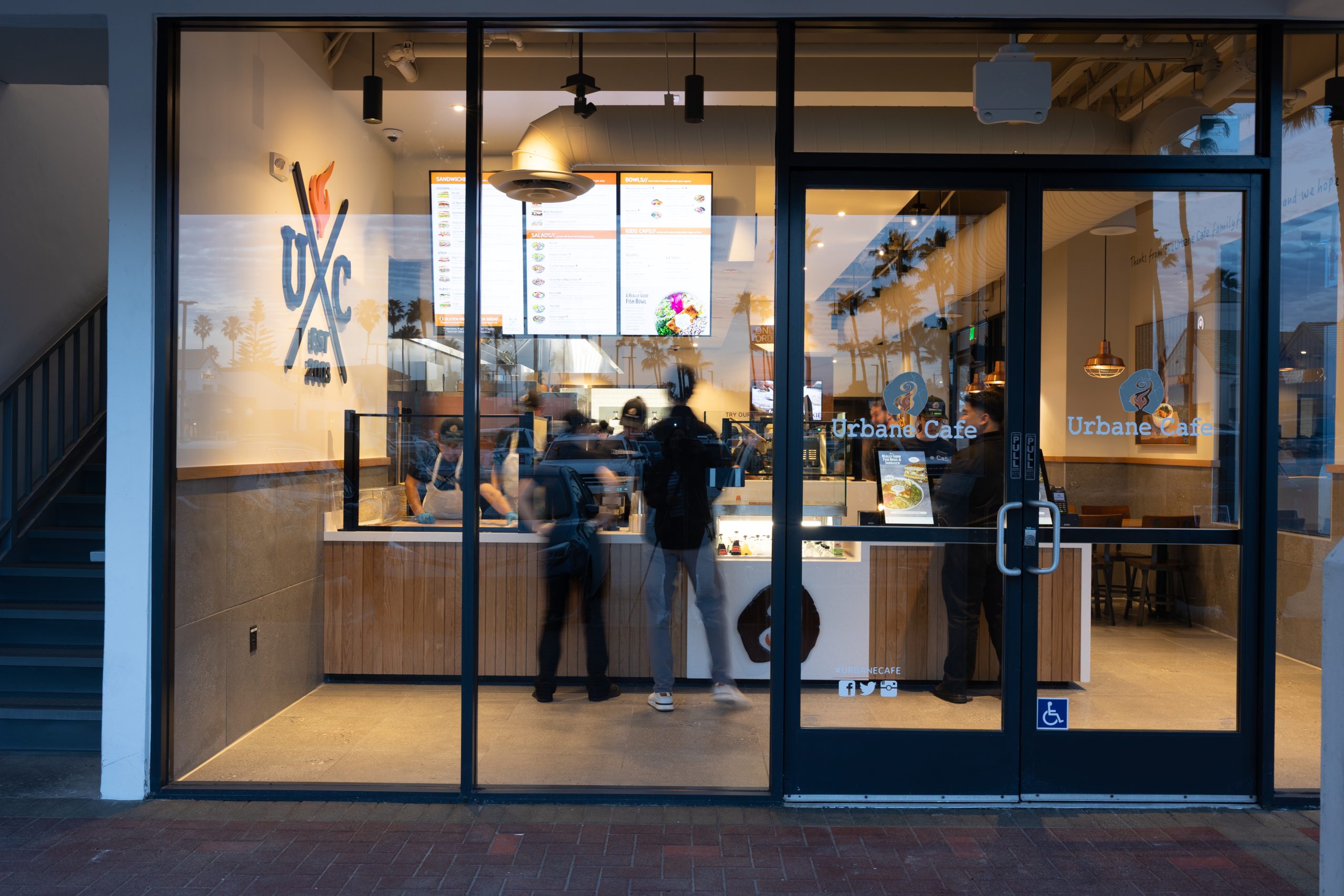
“We used to have two cashiers. Now we really only have one,” says Caprice Kindgren, Director of Marketing at Urbane Cafe. “It’s not like we’re giving worse guest service because there’s a kiosk—you just make sure you’re still welcoming guests.”
The Hybrid Approach: Best of Both Worlds
The most successful operators aren’t choosing between models—they’re blending them.
The hybrid model features kiosks prominently placed at the entrance, one cashier for guests who prefer human interaction, and staff trained to assist kiosk users when needed. Technology handles transactions; humans handle hospitality, problem-solving, and relationship-building.
This approach addresses the friendliness gap while capturing the efficiency gains. Staff feel more valued doing meaningful work instead of repetitive order-taking. Turnover often decreases when employees transition from transactional to hospitality-focused roles.
Decision Framework: Which Model Is Right for You?
Strong candidates for tech-enabled models:
QSR and fast-casual concepts
Weekly revenue above $20,000
Labor costs exceeding 30% of revenue
Markets with $18+/hour wages
Younger demographic (18-45 core customers)
Speed and convenience as competitive advantages
Strong candidates for traditional models:
Fine dining and full-service restaurants
Concepts where service is the product, not just the delivery mechanism
Older demographic (55+)
Complex menus requiring extensive guest education
Brand built on personal relationships
Hybrid model works best for:
Fast casual bridging QSR and full-service
Diverse demographics requiring flexibility
Franchise systems with varied locations
Operators testing technology adoption
Questions to ask yourself:
What’s my current labor cost as a percentage of revenue?
What’s my annual staff turnover rate?
Who is my core customer demographic?
Do I compete on speed and convenience or on experience?
Can I accommodate 1-3 kiosks without compromising guest flow?
The Bottom Line
There’s no universal answer to the labor model question. A Michelin-starred restaurant spending 35-40% on labor isn’t inefficient—they’re investing in the experience that justifies their pricing. Conversely, a QSR hitting 25% labor costs through technology isn’t cutting corners—they’re optimizing for their service model.
The real question isn’t “Should we use technology?” It’s “How much technology serves our guests best while optimizing our operations?”
The best labor model is the one that delivers the experience YOUR guests expect in YOUR market—whether that’s powered by people, technology, or the strategic combination of both.
For restaurant operators, data is everywhere—but actionable insights? Those are harder to come by. You know your kiosks are processing orders, but do you know which locations are outperforming others? Which hours see the highest volume? How much revenue are you leaving on the table with low loyalty engagement?
That’s the challenge Bite set out to solve with our newest feature: the Sales & Analytics Dashboard, now available to all Bite Admin users.
Beyond Order Counts: What the Dashboard Actually Shows You
The Sales & Analytics Dashboard consolidates your kiosk performance data into a single, intuitive view. Instead of piecing together reports from multiple sources or relying on gut instinct, operators can now access real-time insights across their entire organization.
Here’s what you can track:
Sales Performance Across Your Footprint
View total sales, average check sizes, and order volume across all kiosk-enabled locations. Filter by specific date ranges to analyze performance during promotions, seasonal peaks, or new menu rollouts. Compare current performance against any historical period to spot trends and measure growth.
Location-Level Insights
Not all locations perform equally—and that’s valuable information. The dashboard makes it easy to identify your top performers and understand what’s working, while flagging underperforming locations that may need operational attention, menu adjustments, or additional staff training.
Hour-by-Hour Order Trends
Labor costs are one of the biggest line items for any restaurant. The dashboard breaks down order volume by hour, giving you the data you need to optimize staffing levels. See exactly when your kiosks are busiest, and schedule accordingly to improve service speed without overstaffing during slower periods.
Loyalty Program Performance
For brands leveraging loyalty programs through their kiosks, the dashboard provides critical metrics, including loyalty penetration rates (what percentage of orders include loyalty sign-ins), average check uplift from loyalty members, and revenue opportunity forecasting based on increasing loyalty adoption. This helps you quantify the ROI of your loyalty program and identify opportunities to drive enrollment.
Designed for How Operators Actually Work
The dashboard was built with flexibility in mind. Customizable date ranges let you analyze any time period—yesterday’s lunch rush, last month’s performance, or year-over-year comparisons. Location filters allow multi-unit operators to drill down into specific markets, franchisee groups, or individual stores.
Whether you’re a single-location owner checking daily performance or a corporate team managing hundreds of kiosks nationwide, the interface adapts to your needs.
What’s Coming Next
The current release focuses on kiosk channel analytics, but Bite’s product team is already working on expanded capabilities:
Web and mobile ordering analytics to give you a complete picture across all digital channels
Kiosk usage funnel analysis to understand where guests drop off in the ordering process and optimize the user experience
Menu performance insights to identify top-selling items, underperforming SKUs, and upsell opportunities
Why This Matters Now
The restaurant technology landscape has evolved beyond simply automating transactions. Today’s operators need tools that help them understand their business, not just run it.
Kiosks generate thousands of data points every day—customer preferences, ordering patterns, peak times, promotional effectiveness. Without the right analytics tools, that data sits unused. With the Sales and Analytics Dashboard, Bite customers can transform that information into decisions that drive revenue, reduce costs, and improve the guest experience.
Getting Started
The Sales and Analytics Dashboard is now live for all Bite Admin users. To access it:
Questions about the Sales and Analytics Dashboard, or want to learn more about how Bite’s intelligent kiosk platform can grow your business? Contact our team or reach out to your Customer Success Manager.
A newly hired team member walks in for their first shift, looks at the kiosks handling orders, and asks the question every operator hears: “So… what exactly do I do?”
It’s a fair question. The old service model was clear: greet, take order, process payment, hand off to the kitchen, deliver food. But the new model? That’s where many operators and their teams get stuck. Kiosks don’t eliminate hospitality roles—they elevate them. But only if you redesign your service model intentionally.
Operators who leave this to chance end up with staff standing around awkwardly while guests struggle with screens, or worse, employees who feel like technology is replacing them rather than empowering them. Those who build a deliberate hybrid model see higher satisfaction scores, better upsell performance, and lower turnover. And with the restaurant industry’s turnover rate exceeding 75% in 2025, getting this right isn’t just operationally smart—it’s financially critical.
The Role Redefinition That Actually Works
The biggest mistake operators make is implementing kiosks without redefining what their team does. When you leverage technology properly, your staff becomes more effective, not less relevant. Here’s the framework that creates clarity:
Three Core Roles in Hybrid Service
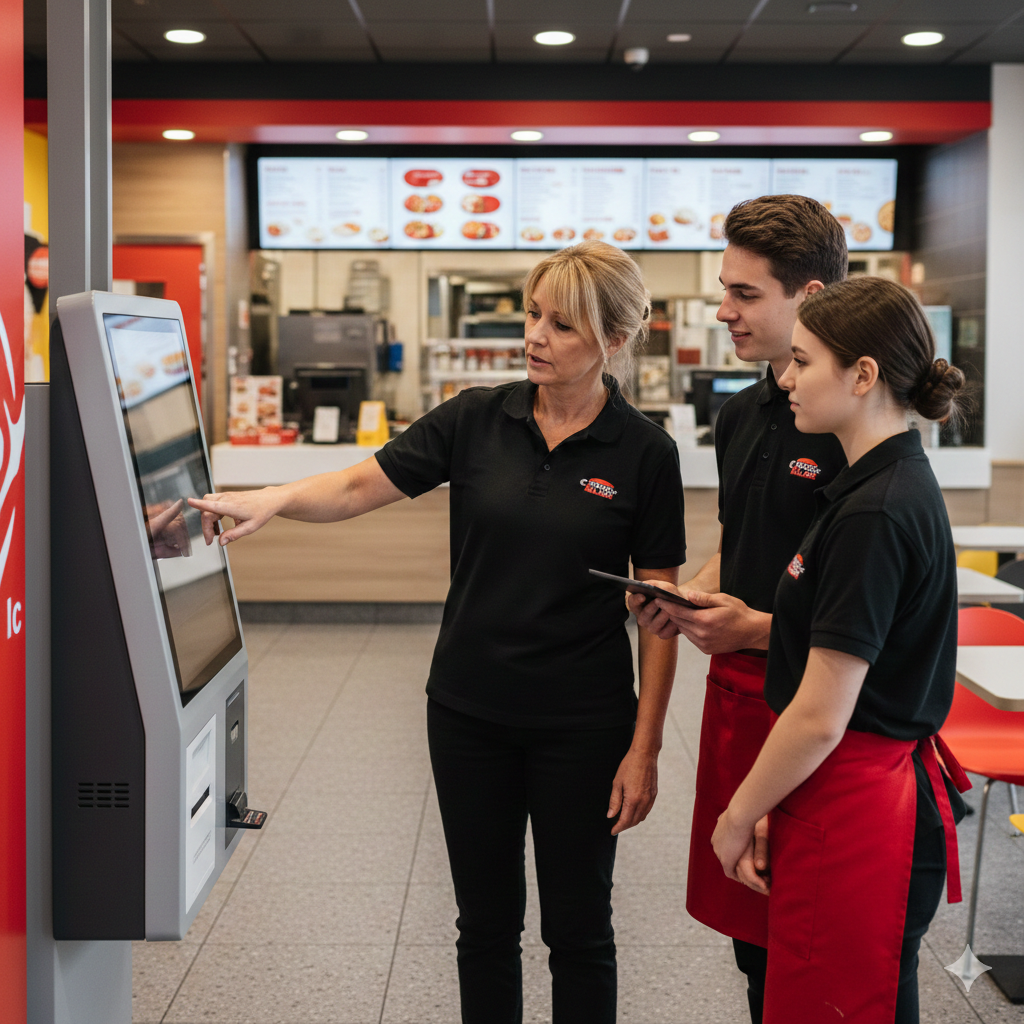
The Greeter/Navigator This is your first impression setter. Your team member quickly assesses guest needs and directs traffic efficiently. At Bite, we call this role a Kiosk Ambassador. A simple “Welcome! Our kiosks make ordering super easy, but I’m here if you need anything” sets a positive tone for confident guests. For those who hesitate, a warm “First time using our kiosks? They’re really intuitive—let me show you” makes the technology feel accessible rather than intimidating.
The Experience Enhancer This role involves strategic support—watching for opportunities to add value where the kiosk can’t. According to industry research, 76% of kiosk-enabled restaurants reduced wait times while 67% increased check sizes. The kiosk handles intelligent upselling through its interface, but staff can layer in personalized recommendations: “I see you’re building a great meal—our signature sauce pairs perfectly with that, and the kiosk makes it easy to add.” This creates a powerful combination of technology efficiency and human insight.
The Fulfillment & Connection Specialist The handoff is where hospitality shines. While kiosks streamline ordering, this moment is all human—a quick quality check, eye contact, and “Enjoy your meal!” creates the memorable experience that builds loyalty. This is also when you catch issues before the guest leaves disappointed.
Position-Specific Responsibilities
What kiosks excel at:
Processing orders quickly and accurately
Displaying full menu options with photos and nutritional information
Suggesting intelligent upsells based on order patterns and data
Handling payment efficiently with multiple methods
Never forgetting to offer add-ons or promotions
What humans excel at:
Reading guests’ body language and emotional cues
Providing personalized recommendations based on conversation
Creating genuine connections and memorable hospitality moments
Adapting to unique situations and special requests
Building regular relationships that drive loyalty
Collaborative opportunities:
Staff guiding guests through kiosk features that match their preferences
Using kiosk data to inform personalized service
Technology handles routine tasks so humans can focus on hospitality
Combining kiosk efficiency with human warmth for optimal experience
Overcoming Staff Resistance (Because It’s Real)
Technology anxiety is legitimate. When employee turnover costs average $5,864 per person—with training accounting for roughly $821 of that—you can’t afford to ignore the human side of implementation.
Common Fears and How to Address Them
“The kiosk is replacing me.” This fear emerges because it’s what staff hear in headlines about automation. The reality? Research shows that 74% of operators say technology will augment rather than replace human labor. Frame it honestly: kiosks handle transactions so humans can handle hospitality. Your team shifts from order-takers to experience-makers, roles that are harder to replace and more fulfilling to perform.
“I don’t know how to help guests with technology.” Staff don’t need to be tech experts. They need simple troubleshooting scripts: “Sometimes it helps to tap a little harder” or “Let me restart this for you real quick.” Provide a one-page quick reference guide, not a technical manual. When staff feel equipped to handle common issues without calling for backup, confidence builds quickly.
“This just creates more work.” The learning curve is real, but temporary. Set clear expectations: the first two weeks will feel awkward, but by week three, the hybrid model actually reduces stress. When kiosks handle ordering complexity, staff can focus on what they do best—connecting with guests and solving problems.
The Onboarding Approach That Works
Week 1: Shadow & Observe Let new hires watch the hybrid model in action during different dayparts. Point out natural hospitality moments: “See how Sarah noticed that the guest was struggling and stepped in? That’s the role.” Build confidence before adding pressure.
Week 2: Supported Practice Role-playing common scenarios makes a huge difference. Practice the guest who can’t find the vegetarian options, the parent ordering for picky kids, and the regular who wants “the usual.” Side-by-side shifts with experienced staff create a safe space for mistakes.
Week 3: Independent with Checkpoints Solo shifts work when paired with structured feedback. Quick daily huddles on what worked and what didn’t help course-correct before bad habits form. Celebrating small wins—”You handled that kiosk freeze perfectly today”—reinforces the right behaviors.
Getting Buy-In from Veterans
Experienced staff often resist harder than new hires because they’ve mastered the old way. The key is involving them in the process design. “You know this operation better than anyone—how should we position staff during lunch rush?” gives them ownership. Highlight how their expertise becomes more valuable, not less, when they’re freed from repetitive tasks to focus on complex situations that require experience.
Creating Clear Responsibilities & Accountability
Vague expectations create the “someone else will handle it” problem. Here’s how to prevent it:
Position Charts & Floor Maps
Visual layouts showing where staff should stand relative to kiosks during different dayparts eliminate confusion. Morning setup might have one person floating near kiosks, while dinner rush needs two. Map traffic flow patterns and create coverage zones so no guest is ever abandoned mid-order.
The 15-Minute Daily Huddle
This isn’t optional. Quick pre-shift meetings cover:
What went well yesterday/what needs improvement
Common guest questions from kiosk orders
Upsell opportunities staff noticed
One skill to reinforce (e.g., “Today, practice the soft approach: ‘Have you tried…’”)
Performance Metrics That Matter
For individual staff:
Guest assistance interventions (quality over quantity)
Order accuracy at pickup
Upsell attachment rates during interactions
For the service model:
Average time from arrival to order completion
Kiosk abandonment rates
Percentage of guests needing staff assistance
According to research on QSR operations, kiosk-linked loyalty programs can boost spend per order by 21% and overall loyalty engagement by 31%—but only when staff are trained to support the technology, not compete with it.
Advanced Training: Beyond the Basics
Once your team has the fundamentals down, these skills separate good hybrid service from exceptional:
Reading Kiosk Body Language
Signs a guest needs help (even if they don’t ask):
Hovering a finger over the screen without touching
Looking around for staff while standing at the kiosk
Multiple back-button taps
Rapid screen switching without adding items
Cultural and generational considerations matter too. Older guests may appreciate a proactive “Can I help you find something?” while younger guests often prefer space until they signal they’re stuck.
The Art of the Soft Upsell
Kiosk suggestions are algorithmic. Human recommendations are personal: “Since you’re getting the burger, a lot of our regulars love pairing it with the sweet potato fries—totally worth it.” That builds connection while increasing ticket size.
Handling System Downtime Gracefully
Technology fails. When it does, staff need backup protocols that maintain guest confidence. Simple pivot scripts work: “Our kiosks are taking a quick break—I can take your order right here and get you taken care of just as fast.” The key is practicing these scenarios before they happen, so staff don’t panic if and when the system freezes during lunch rush.
The Competitive Advantage of Great Hybrid Training
Operators who nail hybrid service training don’t just avoid awkward kiosk implementations—they create differentiation. In a market where technology is table stakes, the quality of human interaction becomes the lasting competitive edge.
Higher check averages: Skilled upselling at key moments can assist algorithmic suggestions
Better guest retention: Memorable experiences beyond efficient transactions keep people coming back
Smoother technology adoption: Teams confident with kiosks adapt more easily to future innovations
The operators winning in 2026 aren’t choosing between technology and hospitality—they’re training teams to deliver both seamlessly. That clarity, translated into structured training and clear responsibilities, transforms kiosks from operational necessity into a genuine competitive advantage.